
SMS Terms
Last updated: October 19, 2026
1. The programme
Great Drs Account Notifications are automated text messages from Great Drs LLC that tell account holders (patients, doctors and partners) that something is waiting in their Great Drs account: a new secure message, an appointment confirmation or reminder, or a pending item. Each text is a short, fixed notice with a link to sign in, written in English (or in Spanish for users who read Spanish). Texts never include medical details, and we never send marketing or promotional texts in this programme.
2. How you opt in
Texts are off until you turn them on. Signed in to the Great Drs platform, open Profile / Account settings → Notifications, choose Text message (SMS), check the consent box (it is never pre-checked) and press Turn on text notifications. The form shows the mobile number the texts will go to (the one in your profile). We record the date, time and version of the text you agreed to. Because the form is inside the signed-in platform, here is a screenshot of it:
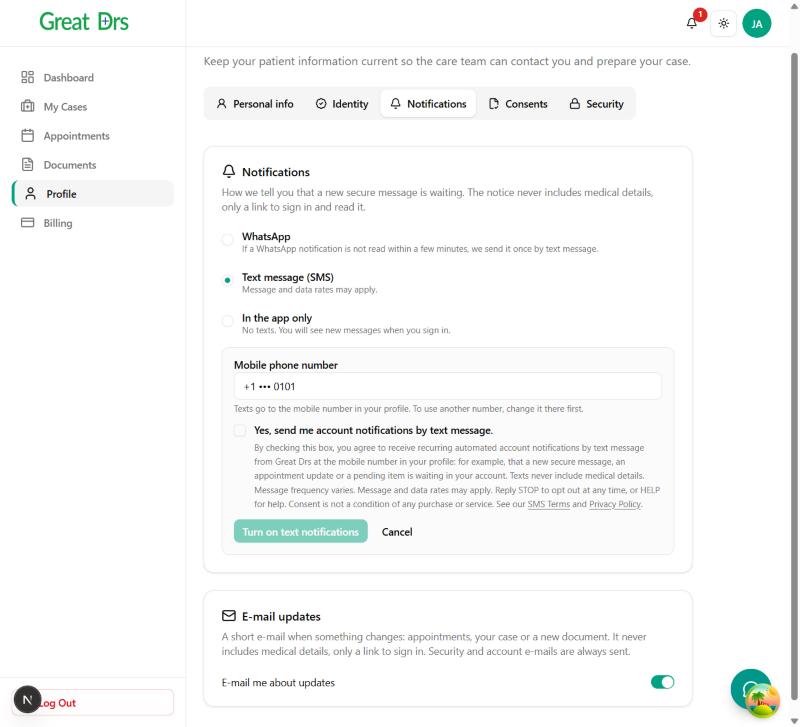
The disclosure next to the checkbox reads:
By checking this box, you agree to receive recurring automated account notifications by text message from Great Drs at the mobile number in your profile: for example, that a new secure message, an appointment update or a pending item is waiting in your account. Texts never include medical details. Message frequency varies. Message and data rates may apply. Reply STOP to opt out at any time, or HELP for help. Consent is not a condition of any purchase or service. See our SMS Terms and Privacy Policy.
Right after you opt in, we send this confirmation:
Great Drs: You're subscribed to account notifications. Msg frequency varies. Msg & data rates may apply. Reply HELP for help, STOP to opt out.
3. Sample messages
Great Drs: You have a new secure message. To protect your privacy and comply with US HIPAA regulations, please click here to log in and reply: https://…
Reply STOP to opt out.Great Drs: Reminder: you have an appointment tomorrow. Open the app for details.
Reply STOP to opt out.
4. Frequency and cost
Message frequency varies with the activity on your account. Message and data rates may apply, according to your mobile plan. Consent to receive texts is not a condition of any purchase or service.
5. How to opt out
Reply STOP to any of our texts (STOPALL, UNSUBSCRIBE, CANCEL, END and QUIT also work). You will get one last text confirming that you are unsubscribed, and no more texts after that. You can also choose In the app only in Notifications at any time. To subscribe again, reply START or turn texts back on in your settings.
6. Help
Reply HELP to any of our texts, or write to support@greatdrs.com.
7. Carriers
Mobile carriers are not liable for delayed or undelivered messages.
8. Privacy
Your mobile number and your text-message opt-in are not shared with third parties or affiliates for marketing or promotional purposes. They are used only to send the notifications described here, through the provider that delivers them. See our Privacy Policy and Terms of Service.
9. Contact
Great Drs LLC · 8 The Green, Ste A, Dover, DE 19901 · support@greatdrs.com